Polar Alignment of LX200R and Ultra Wedge
For The Southern Hemisphere by Chris James
Overview
This document goes
thru the process required to Polar Align the LX200R using a
Ultra Wedge in the Southern Hemisphere. It differs from that described in the
manual for the Northern Hemisphere in that it takes measures to more accurately
place the scope in the Polar Position as the star used by auto star for
alignment Sigma Octanis cannot be seen with the naked
eye under most circumstances, which is not the case for Polaris used in the
northern hemisphere. As a result it uses methods to place the scope in the
Polar position that are normally used during the day. This places the alignment
star in the view scope at the end of this procedure to allow the normal process
to be used to complete the polar alignment procedure.
You will need
a Compass, Spirit Level and a Protractor to complete this process.
Setup Tripod
a)
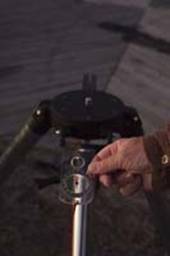
Orientate the tripod using a compass so that tangent arm on the tripod is
pointing north. Dont forget to compensate for
magnetic north in the area.
b)
Using a spirit level, adjust the length of the three legs of the tripod to
achieve level in all directions on the head of the tripod.
|
|
|
|
|
|
|
Level Tripod Head |
Orientate Tripod Using A Compass |

Mount
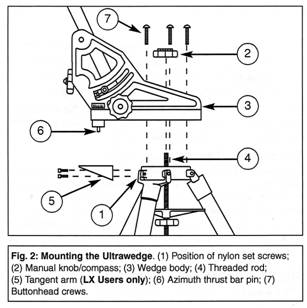
the wedge on the tripod using the Manual Knob/Compass and the three Button Head
bolts. Make the button head bolts firm but not tight to allow the wedge to
rotate on the head of the tripod to perform adjustments.
Confirm
the wedge is still aligned in the North/South direction with the compass
mounted in the Manual Knob. You can correct any alignment with the Azimuth
Control Knob on the wedge or by moving the tripod legs, depending on amount of
the error you need to compensate for. Note: the wedge will now be orientated in
such a manner so that when the scope is place on it, the control box of the
scope will be facing south.
Using
the bubble level in Ultra Wedge, confirm the wedge is still level in all
directions. Adjust tripod legs if required to achieve level. If you have not
already done so, confirm the bubble in the Ultra Wedge is reading true by using
an alternative external spirit level before you solely depend on the inbuilt
bubble level.
Adjust
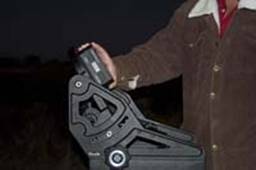
the Tilt Plate for your latitude. The latitude scale on the side of the wedge
should be used as a guide only. Once you are close, use a protractor and the
complementary angle for your latitude. Complementary Angle = 90 minus your Latitude.
For latitude of 32 degrees, the complementary angle is, 90 minus 32 = 58
degrees. Placing the protractor on the tilt plate adjust the fine latitude
control knob until the protractor reads the complementary angle of 58 degrees.
|
Setting Tilt Plate Complementary Angle |
|
Before
attempting to sit the scope base on the tilt panel, insert the single long bolt
and washer into the scope base using the hole at the opposite end to the auto
star interface panel. Use just enough thread to ensure it can hold the scope on
its own but not too much to allow you to slip it through the mounting slot on
the tilt plane. To make this easier, you can lay the bolt in the tilt panel
slot and mark the depth of the tilt panel on the bolt using a pen, before
inserting it into the scope base.
Release
the RA clutch and turn the forks so that one arm of the fork is opposite the
interface panel, then lock the RA clutch again.
You
can now lift the scope onto the tilt plane sliding the one bolt on the
telescope base through the mounting slot on the tilt plane of the wedge.
Align
the telescope base so that all three remaining holes in the telescope base and
the tilt plane align.
Now
use the T-Bar to take some of the weight for safety reasons, dont tighten it too much yet until you have insert and
started the thread on the remaining two bolts through the tilt plane to the
scope base.
Now
tighten all four bolts and ensure the scope base is flush with the tilt panel.
The
proceeding section will assume that the view scope has been mounted and
calibrated so mount all hardware including, focusing unit, diagonal prism, 9mm
Illuminated Reticle eyepiece and view scope.
Release
the RA clutch and place the place the fork arms in the middle of its RA
movement. Checking its travel between the RA stops should show it has about two
turns between stops, so lock the RA clutch about one turn from one of these
stops.
Set Polar Home Position
At this stage
auto star has been turned on and the following has been completed:
Smart
drive init has completed.
GPS
fix has completed.
Polar
mount has been selected in the telescope setup menu.
You
have selected Align scope and chosen the Easy Polar Alignment option.
Auto
Star is now prompting you to place the scope in the Polar Home Position.
Adjusting the RA Zero Position
As
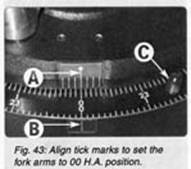
you have centered the RA movement before hand, use
the Auto Star controller to rotate the fork arms to the 00 position so that the
center tick on the arms and base align.
|
|
Setting RA To Zero |
Place
the sprit level across the fork arms and fine tune the RA position so that the
spirit level reads true, you can reduce the RA speed to make this adjustment
real easy when using the sprit level.
Alternatively
you can point the telescope vertically up and place the spirit level across the
telescope cover and fine tune the RA position so that the spirit level reads
true.
Adjusting the DEC 90 degree Position
Release
the Dec clutch and rotate the OTA so the DEC dial reads 90 degrees. Now place
the protractor on the OTA and fine tune the Dec position with the Auto Star
controls using a slow speed, so that the protractor reads your latitude in
degrees, 32 degrees for example.
|
|
Adjust Dec To Your
Latitude |

Now quickly recheck the following:
1)
Is the Bubble on the Wedge still true?
2) Is
the RA indicator roughly on the tick marks at the base and fork arms and the
spirit level across the fork arms showing level?
3)
Is the Dec indicator showing approx 90 Degrees and
the protractor indicating your latitude when placed along the OAT?
4)
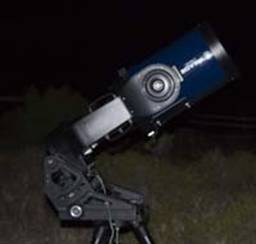
Is the scope pointing at the point in the sky where you imagine the South
Celestial Pole to be?
|
Polar Position Facing SCP |
|
Press ENTER to AutoStar
If
you where able to answer yes to all of the above,
then we are now ready to proceed by pressing ENTER to allow AutoStar
to continue now that you have placed the scope in the Polar Home Position.
If its not dark enough yet to see Sigma Octanis
in your view scope, you may consider using this time while you wait, to Train
your drives (RA & DEC) on a distant terrestrial object and then come back
to this point. Training the drives is not covered in this document.
AutoStar now slews to the Star Sigma Octanis
AutoStar now slews to
Sigma Octanis, dont be
surprised if what seems a small movement in the sky may result in a relatively
long slew in RA for the scope to arrive at Sigma Octanis.
The length of the RA slew will depend on the Local Sidereal Time and date you
are doing this alignment. In other words Sigma Octanis
is quite close to the South Celestial Pole but the scope may take a while to
slew to it depending on the date and time.
A word of caution, this
possible long RA slew may leave the scope in such a position that you cannot
reach the viewfinder / eyepiece in some orientations. More importantly, if you
are not expecting this movement, depending on your setup, you may damage some
expensive accessories that you may have attached to the scope, such as SLR
cameras, as it attempts to slew through positions these attachments cant go. Dont get a nasty
surprise in the dark, know your setup limitations, if any in advance!
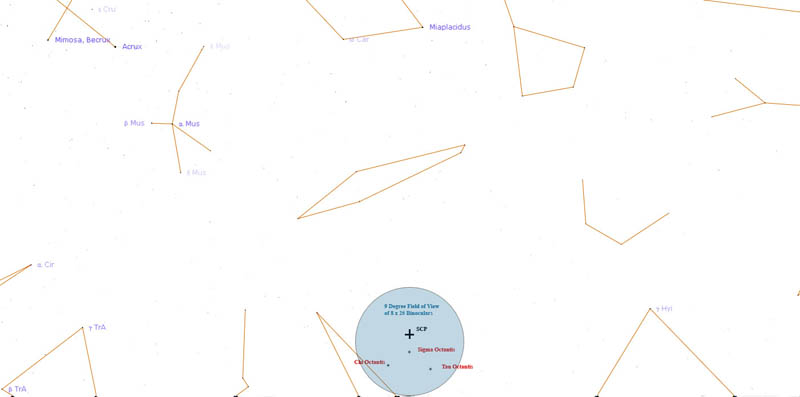
Sigma
Octanis, is quite dim and under most conditions you
will need binoculars or the view scope to see it. I have exaggerated its size
in the chart below. Check Sigma Octanis location on
your sky map to ensure you are happy where it should appear in the sky. RA =
21h 15.515m DEC = 88 deg 55.663m
To find it in the sky, start at the Southern Cross, trace out four times the length of the cross heading towards the SCP. Using the binoculars look in that area and pan around to find three faint stars that form an isosceles triangle that fit within the field of view of the binoculars. Now the two stars that form the side of the triangle that are 90 degrees to the line that you have just drawn from the Southern Cross are Chi Octantis and Sigma Octantis, the third star of the triangle is Tau Octantis.

Once
AutoStar has completed its slew to the Star Sigma Octanis,
With the assistance of the view scope, centre Sigma Octanis in the 9mm Illuminated Reticle eyepiece using the Wedges Azimuth and Latitude controls, do not use the arrow keys on AutoStar. The view scope will display all three stars (Chi, Sigma & Tau Octanis) whilst the field of view of the eyepiece will only display the one. If you have taken care with the setup to this point, Sigma Octanis should be in your eyepiece. If its not, try moving the Azimuth control on the wedge first to find it as its more likely you have made an error aligning North/South with your compass then the Latitude on the tilt plate with the protractor
When
you have Sigma Octanis in the center of the eye piece
press ENTER on AutoStar.
AutoStar will now
select a star from its database and slew to it. Once it has completed slewing,
use the arrow keys on AutoStar to center the selected
star in the eyepiece then press ENTER.
AutoStar will now
select a second star from its database and slew to it. Once it has completed
slewing, use the arrow keys on AutoStar to center the
selected star in the eyepiece then press ENTER.
This
should complete the rough Polar alignment of the wedge and the alignment of AutoStar to to-nights sky.
Drift Polar Alignment ( Precise Polar Alignment )
If
you have done the proceeding Polar Alignment correctly, this section should
only be a fine tune of the polar alignment required for astrophotography.
If
you where unable to complete the proceeding Polar
Alignment because for example Sigma Octanis was not
visible, then the Polar Alignment can still be completed using the drift
method. It just means your starting point may be more off alignment and this
step may take a little longer then would otherwise be
the case.
Fine Adjustment of Wedges Azimuth
Place
the 9mm Illuminated Reticle Eyepiece into the eyepiece holder of the telescope.
With the telescope now tracking, slew the telescope to a bright star near the meridian
close to zenith. Youll find that nearing straight up
brings the Dec close to your latitude in degrees.
Using
the arrow keys on the remote key pad of autostar,
move the scope back and forth in RA. Adjust the cross line pattern to align the
star movement to the RA plane.
Ignoring
any RA drift, compensate for any North/South drift by adjusting the wedges
Azimuth Control Knob. Keep doing this until no noticeable drift occurring over
15 minutes.
In
Short:
1. If
the start drifts south in the eyepiece adjust the Azimuth knob to move the
start east in the eyepiece then re-centre it by using
the autostar controls.
2. If
the star drifts north, adjust the Azimuth knob on the polar mount to move the start
west in the eyepiece then re-centre it by using the
auto star controls.


Fine Adjustment of Wedges Latitude
Slew
the telescope to a bright star near the Eastern or Western Horizon but still
near the celestial equator.
Ignoring
any RA drift, compensate for North/South drift by adjusting the wedges Latitude
Control Knob. Keep doing this until no noticeable drift occurs over 15 minutes.
In
Short:
- Use the Tilt Knob on the Polar Mount to move
the star in the eyepiece in the opposite direction to the North/South
drift.

Keep repeating the Azimuth and Latitude adjustments
above until the changes in one have little effect on the other.
Once you are confident with this process, you may consider
a short cut process that makes better use of the setup time for a astro imaging session.
The url of the short cut process can
be found @ http://www.cwjames.info/astro/howto/polaralignment_short_cut.htm
The url of the process using your
imaging camera can be found @ http://www.cwjames.info/astro/howto/polar_alignment_ccd.htm
|
Written by: Chris James |
|
http://www.cwjames.info/astro/ |